Setting up and customizing Linux machines has always been a pleasure of mine. For years I ran a few clunky local servers at home and hosted every kind of application on them. Then the cloud came, and I slowly moved everything to someone else’s hardware: first a few VPS instances, then the pure cloud stuff (Lambda and friends). It was fine - I stopped worrying about hardware. But I also slowly lost control over my data, and outsourced to the cloud provider everything I used to set up myself. Why fiddle with PostgreSQL on your own box when the cloud sells you a ready-made instance? That convenience got comfortable, and the comfort got expensive: a fixed monthly bill that creeps up year after year, for projects that don’t even make money.
In 2026, I’m trying to get back to an old habit. Alongside self-hosting Immich (I want my personal photos and videos on hardware I control, not on a cloud provider that can do whatever it wants with my data), this time the real goal is to build a local machine powerful enough to run LLM inference, complete with an eGPU bolted on.
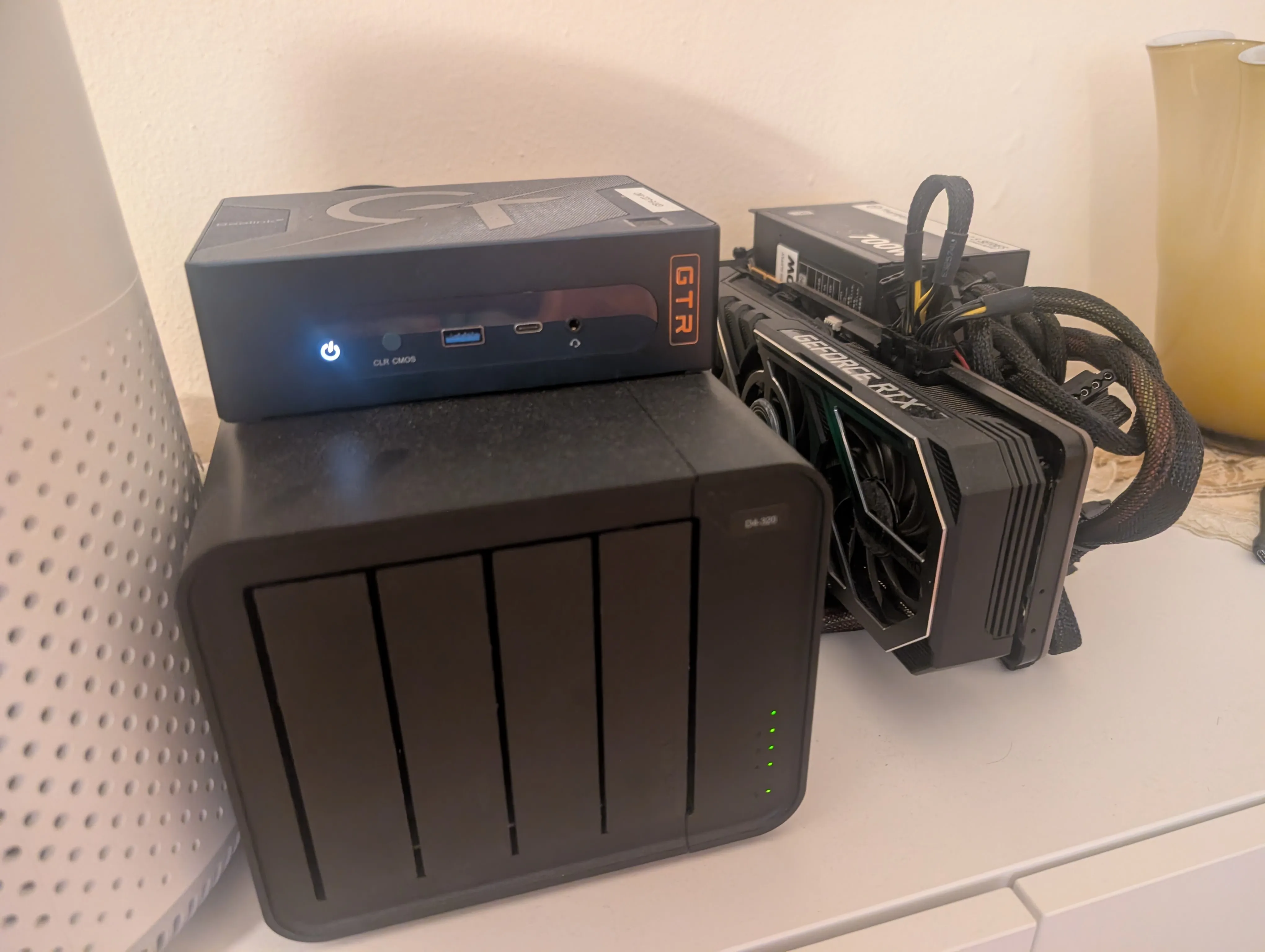
The setup
The base machine is a Beelink GTR7, a compact mini PC that I’ve repurposed as an always-on local server. It’s aimed at people who want a NUC-class box with real desktop-grade silicon, and on paper it’s a decent little machine:
- CPU: AMD Ryzen 7 7840HS - 8 cores / 16 threads, up to 5.1 GHz (Zen 4, x86-64)
- RAM: 64 GB DDR5 (I maxed it out - it’s all the box supports)
- Storage: a 1 TB Samsung 990 PRO NVMe for the OS and models, plus a TerraMaster DAS with four 4 TB HDDs (two Seagate, two WD) in a ZFS raidz2 - about 6.8 TB of usable space, and it survives the death of any two of the four disks. That’s where the bulk data lives: photos, videos, backups
- Network: dual Intel I225-V 2.5 GbE and a Wi-Fi 6 AX200
- OS: Arch Linux, obviously
Then comes the fun part: the GTR7 has two USB4 ports (AMD “Pink Sardine” controllers) and both are doing real work. The slower one carries the TerraMaster DAS with the raidz2 - a USB4 link is well past what four spinning disks can use anyway. The faster one carries a GeForce RTX 3090 (24 GB) - a second-hand card with more VRAM than anything I could buy for the same price today - and that link is worth every byte, because that’s where the GPU gets its bandwidth.
The link between the two is deliberately humble: no $1,000 Thunderbolt enclosure, just an ADT-Link UT4G USB4-to-PCIe x16 riser board with a bracket, which costs about $128 and passes a PCIe 4.0 x4 link over the USB4 cable. From the OS point of view the card just shows up as a normal PCIe VGA device behind the USB4 bridge, which is exactly the magic that makes eGPU-on-Linux workable.
In short: a 64 GB mini PC, a 24 GB GPU on a cable, and enough spinning rust to store a small photo archive. Let’s see how far that gets me.
$ lspci | grep -i vga
6e:00.0 VGA compatible controller: NVIDIA Corporation GA102 [GeForce RTX 3090] (rev a1)
9f:00.0 VGA compatible controller: Advanced Micro Devices, Inc. [AMD/ATI] Phoenix1 (rev c2)
eGPU: The painful setup
On paper, setting up an eGPU on Arch Linux is trivial - usual KISS philosophy - just follow the Arch Wiki.
However, some good old troubleshooting was needed, since the defaults don’t hold up under heavy LLM load. In particular, the NVIDIA 3090 - that’s a beast - is well known for its aggressive power spikes, which put the power supply under pressure. I later found out that this instability can be completely solved by tweaking the power settings. Forget about power saving - that’s the root cause of every issue.
Concretely, I tell the driver to stop dynamically power-managing the card, and while I’m at it I turn off resizable BAR, which can be flaky through a USB4 bridge:
# /etc/modprobe.d/nvidia-power.conf
options nvidia NVreg_DynamicPowerManagement=0 NVreg_EnableResizableBar=0
The kernel itself will park the PCIe link between the mini PC and the card into low-power states if you let it. So the boot command line carries the same philosophy (the pci=assign-busses… part is the hotplug flags from the wiki, with hpmmiosize bumped from 128M to 512M for a 24 GB card):
# /etc/kernel/cmdline
pcie_ports=native pci=assign-busses,hpbussize=0x33,realloc,hpmmiosize=512M,hpmmioprefsize=16G iommu=pt pcie_aspm=off pcie_port_pm=off
pcie_aspm=off keeps the USB4→PCIe link out of its low-power L1 substates, pcie_port_pm=off does the same for the port power management, and iommu=pt runs the IOMMU in passthrough mode. Driver and link both stay wide awake - and that’s the whole fix.
Painful? Yes - finding the right combination of those parameters took me weeks: hours of testing and a system that froze, rebooted, and crashed several times through the various LLM inference sessions. :’)
One variable can’t be grepped: the cable. Those eGPU setups are pretty much a hack - everything should be perfect, the cable should be of high quality and short, and for the love of God, do not touch it while it runs (fun fact: touched it once, kernel panic right after :’) ).
llama.cpp: An even more painful setup?
The LLM world is a mess - I’m serious. If you stick with cloud models, and just go with Claude or some powerful model on OpenRouter or similar, your life is going to be easy.
If instead you want to follow the hard path and do not rely on the cloud (I’m kinda going no-cloud and trying to self-host everything - apart from backups :D), the landscape is not so encouraging. But you’ll learn - a lot.
We have Hugging Face, a good database of models, but the UX is a nightmare (is it just me?), you can find thousands of models there, but half of them are patched by random people (fine-tuned, quantized, re-rolled, whatever), with some strange names (what’s an unsloth, huihui, stheno, uncensored, turbo, uncensored turbo, 😭) and of course every model always claims to be the best version ever.
So I just stuck with the baseline and official models. But there’s a huge landscape of customized models out there, and I treat them like the random .exe of the early 2000s - the keygen, the “cracked” installer: same rule as back then, you only run what a publisher you trust shipped. Honestly, I will not run a .exe (or a .gguf in this case) created by someone I don’t trust - and a .gguf is actually a worse deal than a .exe was. The .exe at least ran its code visibly, once; a model with function calling runs your commands - shell, IDE, tools - and whatever behavior a stranger baked into the weights is 20 GB of numbers you can’t read, triggered by just the right prompt. The rule stays the same as in 2003. The stakes went up.
The obvious choice is going with the models that get the best out of your local GPU - a Google Gemma or Qwen 3.8 model with a quantization that makes sense, of course.
The official pages on Hugging Face at least describe some “recommended parameters” - but as usual, those recommended parameters sometimes work, sometimes don’t. Often the models are stuck in thinking loops, or they think “too much” and repeat their thinking over and over.
The big issue is that, OK, we have those smart models, but of course they have hyperparameters, and those hyperparameters should be tweaked to match the use case - and there’s no perfect recipe.
I’ve spent days figuring out how to configure llama.cpp for the various models I tried. Qwen 3.8 (with a 4 bit quantization) is the best one for my use case, hands down.
I just keep 2 models and swap them according to the task: one for general coding (Qwen 3.8 4bit) and one for fast autocompletion. The default is Qwen 3.8, since FIM models are not so frequently used nowadays. llama.cpp with its router mode is perfect for this use case. For picking what the GPU can actually fit, I ended up using llmfit, which is a great tool to squeeze the GPU: it filters models by type and tells you what fits your current hardware. The presets live in ~/.cache/llmfit/presets/model.config.ini - here’s how I configured them:
version = 1

# Global settings (RTX 3090 24GB + 64GB RAM)
# Note: for non-autocomplete models, always check they support tool calling
# otherwise they are pretty much useless for using in IDEs/pi
# model loading: memory-mapped (--mmap/--mlock are deprecated in favor of --load-mode)
load-mode = mmap
# Note: n_slots=4 per instance (router default). 24GB fits one model at a time: 27B (20-24GiB), 7B@32K (~11GiB)

gpu-layers = -1
flash-attn = on
# Cache settings
cache-type-k = q8_0
cache-type-v = q8_0

# use the chat template embedded in GGUF
jinja = true

# Qwen2.5-Coder-7 - For autocomplete
[Qwen2.5-Coder-7B-Instruct-Q8_0]
model = /home/pgaleone/.cache/llmfit/models/Qwen2.5-Coder-7B-Instruct-Q8_0.gguf
ctx-size = 32768
temperature = 0.7
top-p = 0.95
top-k = 30
min-p = 0.0
presence-penalty = 0.0
repeat-penalty = 1.1
spec-type = ngram-mod

[Qwen3.8-27B-Q4_K_M]
model = /home/pgaleone/.cache/llmfit/models/Qwen3.8-27B-Q4_K_M.gguf
ctx-size = 65536
temperature = 1.0
top-p = 0.95
top-k = 20
min-p = 0.0
presence-penalty = 0.0
repeat-penalty = 1.0
no-context-shift = true
spec-type = ngram-mod
# the default is xhigh that's too much
reasoning-effort = medium
The important parameters here are:
- Using
jinja: this makes llama.cpp format messages with the chat template embedded in the model’s GGUF - the same standard format the model was trained with (message layout, system placement, tool-calling syntax) - instead of its own hardcoded guess. It’s also what makes tool calling work at all: if the template doesn’t handle tools, the model has no way of calling them - The 8-bit KV cache - no less. The KV cache is what the model “remembers” about the conversation: at every step it re-reads all the previous key/value vectors to compute attention. Quantize them too aggressively and the attention scores drift, the model starts losing track of the early context, and on long conversations that shows up as repetition and ignored instructions. q8_0 is the sweet spot - the cache takes about half the VRAM of fp16 with quality I can’t tell apart from fp16, while q4_0 KV is where the degradation actually starts to be visible.
no-context-shift: I prefer receiving a message about the end of context, rather than having llama.cpp silently deleting the initial parts of the conversation for me. Note: I contributed to pi-observational-memory for this reason. That type of control, IMHO, should live in the harness, not on the model’s server.- The speculative decoding (
spec-type = ngram-mod): llama.cpp drafts the next tokens by scanning the context itself for n-grams - sequences it has already seen - and then verifies several of them in a single forward pass of the real model instead of one token at a time. No second model, no extra VRAM: you’re just asking “have I written something like this before?” It pays off most where the content is repetitive, which for a coding/autocomplete workload is a lot of the time (boilerplate, repeated patterns). It’s a free speedup when it hits and a no-op when it doesn’t, so I verify the real tokens/s after a restart and remove it if there’s no gain. - The reasoning effort set to medium: Qwen 3.8 thinks too much at the default - there’s a real risk of burning most of the context just on thinking, and I’ve seen that high/xhigh thinking gives me no advantage (no better answers) for the tasks I give it.
Performance
No llama-bench tables here - these are from the service that runs day to day, real traffic from the journal: Qwen 3.8 27B Q4_K_M on the 3090, 64K context, 8-bit KV cache, speculative decoding on.
- Generation: median about 38 tokens/s, with spikes up to about 280 t/s when speculative decoding hits on repetitive code
- Prompt evaluation: about 900-1200 tokens/s on big prompts; re-reading a 16-18K token context takes 15-20 seconds
- VRAM: 20.7 of 24.6 GB used with the full 64K context. It fits, exactly like the arithmetic said it would
Slower than a datacenter, obviously. But none of my code, context, or keystrokes leave the building.
Lessons Learned
I still like setting up servers. I can reach this box and all its services over WireGuard, open my llama.cpp UI, and point any IDE (actually vim, with a plugin I wrote for embedding pi inside it vim-pi-chat) at my self-hosted models - from anywhere in the world.
The LLM scene is messy, full of hype, and there are very few people who know what they’re doing. Huge respect for the people who don’t just use these services but actually try to understand them. Setting up a local inference server and making it work as expected is a nice journey I highly recommend to anyone. I learned a lot in this process.
I think we need something like a “hands-on wiki” for LLMs - something like HF but usable. I’m probably too used to Arch Linux, but I would love to have a wiki, with a page for every model, and a section with the tested parameters for the various tasks and GPU architectures. Maybe I’ll start this new project sooner or later.